The Onn 4K Plus and TiviMate are the two most searched-for budget IPTV tools in 2026 — and for good reason. Together they form the most capable, most affordable IPTV setup money can buy: a $30 Google TV dongle that installs TiviMate directly from the Play Store (no sideloading, no developer mode) and a best-in-class IPTV player that makes 50,000+ live channels feel like a premium cable package.
This is the definitive pillar guide to TiviMate on Onn 4K Plus. It covers the hardware in depth, walks through every step of the installation, explains TiviMate's full feature set, and tells you exactly which settings to change for perfect 4K streaming. Every section links to a dedicated spoke article for readers who want the full picture on any specific topic.
Need an IPTV subscription for TiviMate on your Onn 4K Plus?
Flickhaven: 50,000+ channels · 4K UHD · Sky Sports · Full EPG · Anti-Freeze™ CDN
Table of Contents
- What Is the Onn 4K Plus? Full Hardware Overview
- What Is TiviMate? The Best IPTV Player for Google TV
- Why the Onn 4K Plus + TiviMate Combination Works
- Onn 4K vs 4K Plus vs 4K Pro — Which Is Best for IPTV?
- Onn 4K Plus vs Firestick 4K — Full IPTV Comparison
- How to Install TiviMate on Onn 4K Plus (Step-by-Step)
- How to Set Up the EPG (TV Guide) in TiviMate
- TiviMate Free vs Premium — Is the Upgrade Worth It?
- Best IPTV Apps for Onn 4K Plus (Full Comparison)
- TiviMate Buffering on Onn 4K Plus — Causes & Fixes
- Best IPTV Service for TiviMate on Onn 4K Plus
- TiviMate Settings to Change on Day One
- Spoke Network — Every TiviMate & Onn 4K Plus Topic
- Frequently Asked Questions
~$30
Onn 4K Plus Price
Play Store
TiviMate Install
50,000+
Live Channels (Flickhaven)
< 5 min
Setup Time
What Is the Onn 4K Plus? Full Hardware Overview
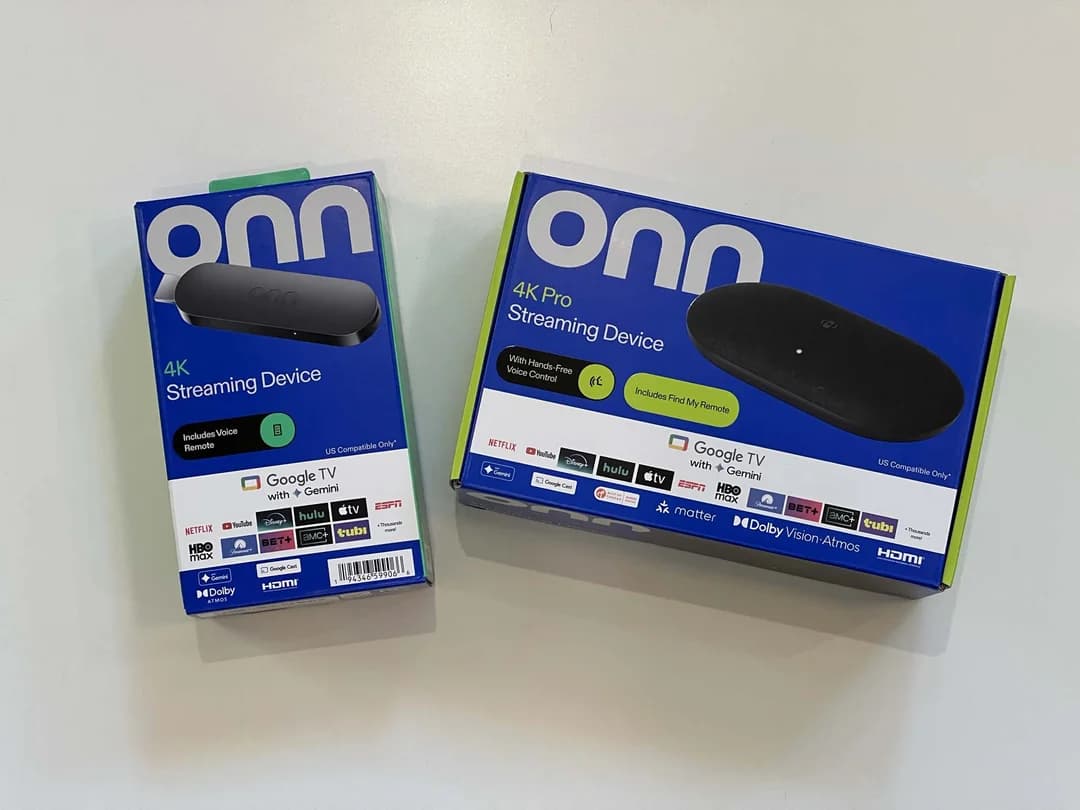
The Onn 4K Plus is Walmart's own-brand Google TV streaming dongle, sold under the onn. label in the electronics section for around $30. Despite its entry-level price, it is a fully capable streaming device that outpunches its weight class for IPTV use — primarily because it runs Google TV (built on Android TV), giving it native access to the Google Play Store and every Android TV app including TiviMate.
The Onn 4K Plus sits above the standard Onn 4K in the product range. The key upgrade is Dolby Vision and HDR10+ support — the two premium HDR formats that deliver the best picture quality on compatible 4K TVs. For IPTV viewers watching Sky Sports, Premier League, and Formula 1 content in 4K HDR, this matters.
Operating System
Google TV (Android TV)
Resolution
4K UHD
HDR Formats
Dolby Vision · HDR10+ · HDR10 · HLG
Audio
Dolby Atmos · Dolby Digital Plus
Wi-Fi
Wi-Fi 5 (802.11ac) — 2.4GHz + 5GHz
Connectivity
HDMI · USB-C power · Micro-USB (Ethernet adapter)
TiviMate
Available on Google Play Store
Price
~$30 at Walmart (US) · ~$35 shipped
The Onn 4K Plus connects to your TV via HDMI and is powered by USB-C. The included remote has Google Assistant voice search, quick-access buttons for common streaming services, and a dedicated Google TV home button. For IPTV, the only addition worth considering is a USB-C to Ethernet adapter (~$8) for a wired connection — especially if your router is nearby or you watch a lot of 4K content.
What is Google TV?
Google TV is Google's smart TV operating system — a layer built on top of Android TV that adds a curated home screen, personalised content recommendations, and Google Assistant integration. For IPTV purposes, what matters is the foundation: Google TV devices run Android TV, which means the full Google Play Store is available. Every app that runs on Android TV runs on Google TV — including TiviMate, IPTV Smarters Pro, OTT Navigator, Kodi, VLC, and every major IPTV player in existence.
This is the fundamental reason the Onn 4K Plus is better for IPTV than Amazon Firestick: no sideloading, no developer mode toggles, no APK hunting. TiviMate is in the Play Store and installs in one tap.
What Is TiviMate? The Best IPTV Player for Google TV
TiviMate is the most widely used IPTV player app for Android TV and Google TV devices. Developed by Artem Golitsyn, TiviMate connects to any IPTV service using Xtream Codes credentials or an M3U playlist URL, downloads your full channel list and EPG, and presents them in a polished TV-optimised interface that feels closer to a native smart TV experience than any competing app.
What separates TiviMate from other IPTV players is the combination of interface quality, EPG depth, and playback reliability. The channel list is smooth and fast. The EPG shows a full 7-day rolling guide with programme descriptions. Switching between channels is near-instant. 4K HDR playback is handled by the device's hardware decoder, keeping quality maximum while keeping the app responsive.
TiviMate's Core Features
Xtream Codes & M3U support
Connect to any IPTV service — paste your server URL, username, and password and your channel list loads automatically.
Full 7-day EPG
Electronic Programme Guide shows what's on every channel for the next 7 days — browse like a proper TV guide, not a list of URLs.
Live TV, VOD & Series
One app handles live channels, the video on-demand library, and series in separate, clearly organised tabs.
Catch-up TV
Watch programmes broadcast in the past 7 days on-demand — equivalent to BBC iPlayer + ITVX + All 4 combined.
Favourites & Groups
Organise your channel list into custom favourites and groups. Hide channels you never watch. Surface the ones you use most.
Hardware decoding
TiviMate offloads video decoding to the Onn 4K Plus's dedicated hardware decoder — ensuring smooth 4K HDR playback without taxing the CPU.
Parental controls
Lock channels or the app itself with a PIN. Restrict access to adult content or specific channel groups.
For a deep-dive review of TiviMate's every feature, see our dedicated TiviMate review.
Why the Onn 4K Plus + TiviMate Combination Works
The reason "tivimate onn 4k plus" generates 1,600+ monthly searches is that this exact combination solves the four biggest friction points in budget IPTV setup:
No sideloading headache
TiviMate is on the Google Play Store. On Onn 4K Plus you install it in one tap — no developer mode, no APK download, no Downloader app. The friction that puts off first-time IPTV users simply does not exist here.
4K HDR without a premium price
At $30, the Onn 4K Plus supports Dolby Vision, HDR10+, and Dolby Atmos. You are getting the full 4K HDR experience at a fraction of the cost of an Apple TV 4K or a high-end Android TV box.
Best IPTV player on the best OS
TiviMate is the #1 IPTV player for Android TV / Google TV. Pairing it with the Onn 4K Plus — which runs Google TV natively — means you get the best app on the best platform without compromise.
No walled-garden restrictions
Amazon Firestick restricts app installs to the Amazon App Store. Google TV has no such restriction — every IPTV app, VPN, and utility installs cleanly from the Play Store. You are not locked into one ecosystem.
Onn 4K vs 4K Plus vs 4K Pro — Which Is Best for IPTV?
Walmart sells three Onn Google TV devices. All three run Google TV, all three support TiviMate from the Play Store — but they differ in picture quality, features, and price. Here is how they stack up for IPTV streaming specifically.
| Feature | Onn 4K | Onn 4K Plus ★ | Onn 4K Pro |
|---|---|---|---|
| TiviMate (Play Store) | ✓ | ✓ | ✓ |
| HDR10 | ✓ | ✓ | ✓ |
| Dolby Vision | ✗ | ✓ | ✓ |
| HDR10+ | ✗ | ✓ | ✓ |
| Dolby Atmos | ✓ | ✓ | ✓ |
| Wi-Fi | Wi-Fi 5 | Wi-Fi 5 | Wi-Fi 5 |
| Ethernet | Adapter | Adapter | Adapter |
| Hands-Free Voice | ✗ | ✗ | ✓ |
| Find My Remote | ✗ | ✗ | ✓ |
| Price | ~$20 | ~$30 | ~$50 |
| IPTV Verdict | Budget pick | Best value | Power users |
The verdict for IPTV viewers
The Onn 4K Plus is the best value IPTV device in the Onn lineup. The extra $10 over the standard 4K buys Dolby Vision — the premium HDR format used by Netflix, Disney+, and the best IPTV 4K streams. Unless you specifically need hands-free voice control, there is no reason to pay the extra $20 for the 4K Pro.
Onn 4K Plus vs Firestick 4K — Full IPTV Comparison
The Amazon Firestick 4K is the default recommendation for IPTV in almost every forum post and YouTube video. In 2026, the Onn 4K Plus challenges that dominance on almost every front that matters for IPTV users.
| Factor | Onn 4K Plus | Firestick 4K |
|---|---|---|
| TiviMate Install | Google Play Store — 1 tap | Must sideload via Downloader |
| Developer Mode Required? | No | Yes (for TiviMate) |
| App Store | Google Play (full) | Amazon App Store (limited) |
| HDR Support | Dolby Vision + HDR10+ | Dolby Vision + HDR10+ |
| 4K Resolution | ✓ | ✓ |
| Dolby Atmos | ✓ | ✓ |
| Price | ~$30 | ~$50 |
| VPN App Support | Any Android TV VPN | Requires sideload or Fire-specific VPN |
| IPTV App Variety | Full Android TV catalogue | Limited to Amazon App Store |
| OS | Google TV (Android TV) | Fire OS (Amazon fork) |
| Alexa / Google Assistant | Google Assistant | Alexa |
| IPTV Verdict | Better value, easier setup | More mainstream, harder TiviMate install |
The Onn 4K Plus wins on every metric that matters for IPTV: cheaper price, easier TiviMate install, and no restriction on which apps you can run. The only reason to choose Firestick over Onn 4K Plus is if you are already deep in the Amazon ecosystem and prefer Alexa. For IPTV-first use, Onn 4K Plus is the better choice.
For a full head-to-head, read our IPTV Firestick setup guide and compare it against this guide.
How to Install TiviMate on Onn 4K Plus (Step-by-Step)
.webp&w=1920&q=75)
This is the complete installation process. Unlike Firestick, there is no developer mode to enable and no APK to sideload — TiviMate installs directly from the Google Play Store in one step.
Set Up Your Onn 4K Plus
Plug the Onn 4K Plus into an HDMI port on your TV. Connect to power via USB-C. Follow the on-screen Google TV setup — connect to Wi-Fi, sign in with your Google account. The Google Play Store is available once setup is complete.
Open Google Play Store
On the Google TV home screen, scroll to the Apps section and open the Google Play Store. You can also use the search icon at the top to search directly for TiviMate.
Search for TiviMate IPTV Player
In the Play Store search bar, type 'TiviMate IPTV Player'. Select the app by developer Artem Golitsyn. Tap Install — it is free. The download takes under 60 seconds on a standard broadband connection.
Open TiviMate and Add a Playlist
Once installed, tap Open. On the TiviMate welcome screen, tap Add Playlist. You will see three options: Xtream Codes API, M3U URL, and Local File. Select Xtream Codes API — this is the format used by Flickhaven and all major IPTV providers.
Enter Your IPTV Credentials
Enter your Server URL in the first field (e.g. http://yourprovider.com:8080 — the exact URL is in your welcome message). Enter your Username and Password in the remaining fields. These were sent to you via WhatsApp or email when you subscribed to Flickhaven. Tap Add.
Wait for Channels to Load
TiviMate authenticates against the server and downloads your full channel list, VOD library, series, and EPG data. This takes 30–90 seconds on a typical broadband connection. A progress bar shows the download status.
Navigate Your Channel List
Once loaded, you will see your full channel list organised by group — UK channels, Sports, Movies, Entertainment, International, and more. Press the home button on your remote to return to the TiviMate dashboard. Select Live TV to start watching.
Add TiviMate to Your Home Screen
Long-press the TiviMate icon in the Apps section and select 'Move to top' or 'Add to home screen'. This puts TiviMate on the Google TV home screen for instant access without navigating through the Apps menu every time.
Need IPTV credentials for TiviMate?
Flickhaven provides Xtream Codes credentials instantly via WhatsApp after subscribing. Free 24-hour trial — no credit card.
How to Set Up the EPG (TV Guide) in TiviMate on Onn 4K Plus
The EPG (Electronic Programme Guide) is what makes TiviMate feel like a premium TV experience rather than a list of stream URLs. With a full EPG you can browse what is on across all channels, see upcoming programmes, access catch-up TV for broadcasts that already aired, and set reminders for live events.
If your IPTV provider uses Xtream Codes (like Flickhaven), the EPG is embedded in your credentials and populates automatically. You do not need a separate EPG URL. If the guide is empty after your initial setup, follow these steps.
Open TiviMate Settings
From the TiviMate home screen, press the Menu button on your remote (or long-press OK) and select Settings. Navigate to EPG.
Check EPG Sources
Under EPG → EPG Sources, your Flickhaven playlist should be listed with a green checkmark. If it shows no source, tap Add EPG Source and enter your Xtream Codes server URL — TiviMate will detect the EPG automatically.
Force an EPG Update
Tap Update EPG Now. TiviMate downloads programme data for all channels in your list. Allow 2–3 minutes for a full download — a progress counter shows the number of programmes loaded.
Set Days to Load
Under EPG settings, set Days to Load to 7 for a full week's guide. Set the EPG Update Interval to Every 12 Hours so the guide stays current without manual refreshing.
Browse the Guide
Return to Live TV and press the down arrow while a channel is selected to open the programme guide. Left/right arrows scroll through time. Up/down arrows move between channels. Press OK on any programme to watch or set a reminder.
Flickhaven includes a full 7-day EPG for all UK channels — no separate EPG URL required. EPG data loads automatically with your Xtream Codes credentials.
Best IPTV Apps for Onn 4K Plus (Full Comparison)
Because the Onn 4K Plus runs Google TV, you have access to every IPTV app on the Play Store. Here is how the top four compare for use on the Onn 4K Plus specifically.
TiviMate IPTV Player
Best Overall★★★★★
Pros
- ✓Best UI for Google TV / Android TV
- ✓Smooth 4K HDR playback
- ✓Superior EPG with 7-day guide
- ✓Picture-in-picture (Premium)
- ✓Near-instant channel switching
Cons
- –Premium features require one-time purchase
- –Slightly technical for first-time users
IPTV Smarters Pro
Best Free Alternative★★★★☆
Pros
- ✓100% free on Play Store
- ✓Live TV + VOD + Series in one app
- ✓Built-in parental controls
- ✓Good for beginners
- ✓Works well on Onn 4K Plus
Cons
- –Less polished UI than TiviMate
- –EPG browsing less intuitive
- –No multi-screen without upgrade
OTT Navigator
Power User Pick★★★★☆
Pros
- ✓Highly customisable interface
- ✓Excellent catch-up integration
- ✓Supports multiple EPG sources
- ✓Group management features
Cons
- –Steeper learning curve
- –Less maintained than TiviMate
- –Some features buried in menus
Kodi (PVR IPTV Simple Client)
Advanced Users★★★☆☆
Pros
- ✓Open-source and free
- ✓Extreme customisability via add-ons
- ✓Runs on almost any device
- ✓Large community support
Cons
- –Not optimised for IPTV out of the box
- –Requires manual add-on configuration
- –Heavier on device resources
For a full breakdown of every IPTV app available in the UK, see our guide to the best IPTV apps UK.
TiviMate Buffering on Onn 4K Plus — Causes & Fixes
Buffering interrupts the viewing experience more than any other IPTV issue. On the Onn 4K Plus specifically, buffering has four root causes — and each has a targeted fix.
Slow or congested Wi-Fi (2.4GHz)
Most common cause
The Onn 4K Plus defaults to the 2.4GHz Wi-Fi band if both bands have the same network name (SSID). 2.4GHz is slower and more congested than 5GHz. Fix: Go to Onn 4K Plus Settings → Network → Wi-Fi → connect specifically to your 5GHz network (usually labelled with '5G' or '_5GHz'). Alternatively, use a USB-C to Micro-USB OTG Ethernet adapter to wire directly to your router — this eliminates Wi-Fi buffering entirely.
Small TiviMate buffer size
Common on 4K streams
TiviMate's default buffer size is 3 seconds — too small for 4K HDR streams that have larger data segments. Fix: In TiviMate → Settings → Player → Buffer Size → increase to 10 seconds (or 15 seconds for very large 4K streams). This pre-loads more of the stream before playback begins and smooths over brief network hiccups.
Hardware decoding off or incorrect
Affects 4K specifically
If hardware decoding is disabled, the Onn 4K Plus's CPU handles video decoding in software — it cannot keep up with 4K streams. Fix: TiviMate → Settings → Player → set Hardware Decoding to Auto. This passes decoding to the dedicated hardware decoder and immediately reduces buffering on 4K channels.
IPTV provider server overload
Occurs during peak events
During Champions League finals, Grand Prix, and boxing PPV events, underpowered IPTV servers can overload. Fix: Check whether your provider has backup streams (labelled 'backup' or 'B2' in the channel list). If not, this is a provider infrastructure problem — switch to an IPTV service with CDN load balancing like Flickhaven's Anti-Freeze™ technology, which distributes load across multiple UK server nodes.
For a complete IPTV buffering fix guide, see our article: IPTV not loading channels — full fix.
Best IPTV Service for TiviMate on Onn 4K Plus
TiviMate is the player — it does not include any channels. You need a separate IPTV subscription that provides Xtream Codes credentials (Server URL, Username, Password). The quality of the IPTV service you choose determines 90% of your viewing experience.
Here is what to look for in an IPTV service specifically for TiviMate on Onn 4K Plus:
- ✓Xtream Codes support — TiviMate works best with Xtream Codes — it enables EPG, VOD, Series, and catch-up in one unified flow.
- ✓4K UHD streams — The Onn 4K Plus supports Dolby Vision — your IPTV provider should offer 4K UHD streams to unlock the device's full capability.
- ✓UK server infrastructure — UK-hosted or UK-peered CDN nodes deliver lower latency and fewer buffering events than servers based in other countries.
- ✓Full UK EPG — A 7-day EPG for BBC, ITV, Sky, and TNT channels is essential for live sport scheduling and catch-up TV.
- ✓Free trial — Any reputable provider offers a trial period — you should test performance on your specific broadband and device before committing.
Flickhaven — Best IPTV for TiviMate on Onn 4K Plus
- ✓Xtream Codes credentials — native TiviMate integration
- ✓50,000+ live channels including all UK and international content
- ✓4K UHD streams on Sky Sports, Premier League, Formula 1, and boxing
- ✓Anti-Freeze™ CDN — 99.9% uptime across peak match days
- ✓Full 7-day EPG included — no separate EPG URL needed
- ✓99,000+ VOD titles — movies, box sets, documentaries
- ✓7-day catch-up TV on all major UK channels
- ✓Free 24-hour trial — no credit card required
- ✓Plans from £14.99/month or £54.99 for 14 months (12 + 2 free)
TiviMate Settings to Change on Day One
Out of the box, TiviMate's default settings are conservative. These ten changes will transform your Onn 4K Plus IPTV experience from day one.
.webp&w=1920&q=75)
Player → Hardware Decoding → Auto
Offloads 4K decoding to the hardware decoder. Eliminates stuttering on high-bitrate 4K streams.
Player → Buffer Size → 10 seconds
Smooths out brief network hiccups. Critical for stable 4K viewing.
EPG → Days to Load → 7
Loads a full week's programme guide. Essential for scheduling sports and catch-up.
EPG → Update Interval → Every 12 Hours
Keeps the guide current automatically without manual refreshing.
EPG → Update on App Start → On
Ensures the guide is always fresh when you open TiviMate.
General → Start with Favourites → On
Opens TiviMate directly to your curated favourite channels, skipping the full 50,000-channel list.
Player → Skip Short Channels → Off
Prevents TiviMate auto-skipping channels it deems too short — some SD channels trigger this incorrectly.
General → Confirm on Exit → On
Prevents accidental app closure when pressing back on the remote.
Player → Aspect Ratio → Auto
Correctly fills the Onn 4K Plus's 4K output without letterboxing or stretching.
General → Auto-Select Last Channel → On
Returns to the last channel you were watching when you re-open TiviMate.
Explore Every TiviMate & Onn 4K Plus Topic
This pillar covers the full picture of TiviMate on Onn 4K Plus. Each spoke article below goes deeper on a specific topic — from device comparison to buffering fixes to IPTV service reviews. Every spoke links back to this guide as the authoritative reference.
TiviMate Onn 4K Plus — Frequently Asked Questions
Does TiviMate work on the Onn 4K Plus?+
How do I install TiviMate on the Onn 4K Plus?+
Do I need to sideload TiviMate on the Onn 4K Plus?+
What is the difference between the Onn 4K and Onn 4K Plus?+
Is the Onn 4K Plus better than Firestick for IPTV?+
Is TiviMate Premium worth it on the Onn 4K Plus?+
Why is TiviMate buffering on my Onn 4K Plus?+
What IPTV service works best with TiviMate on Onn 4K Plus?+
How do I set up the EPG in TiviMate on Onn 4K Plus?+
Can I use a VPN with TiviMate on Onn 4K Plus?+
Ready to Stream on Your Onn 4K Plus?
TiviMate is installed in one tap — now you need the IPTV subscription behind it. Flickhaven gives you 50,000+ live channels, 4K UHD, full EPG, and a 24-hour free trial with no credit card required.
No credit card required · Instant activation · Cancel any time
For the full IPTV picture: complete IPTV guide · IPTV UK guide · best IPTV UK 2026 · free IPTV trial.